
A Next.js SEO release should begin with the intended behaviour for each public URL, not with a list of framework features. Decide whether the URL should exist, be crawlable, be indexable, consolidate elsewhere or return a missing response before choosing the App Router implementation.
This checklist maps that policy to current Next.js 16.3.0 APIs and file conventions, the output a reviewer should expect in production and the evidence that should be retained. It is an implementation and release aid, not a full technical audit or a website migration plan.
Correct implementation can make the declared behaviour testable and consistent. It does not guarantee crawling, indexing, a rich result, rankings, clicks or enquiries.
Next.js 16 release control template
Keep policy, implementation and production evidence together
Use the source-labelled matrix to assign every control, define expected output and keep immediate release acceptance separate from later search processing.
Supporting files
Inspect the example and share the workflow
Use these companion files with the main worksheet. Check the evidence and limitations before adapting any example to a real website or campaign.
Set the scope and version boundary
This resource is written for the Next.js 16.3.0 App Router. Next.js changes over time, so confirm the installed version and read the matching official documentation before copying an API, file convention or caching assumption into a release plan.
Keep the page or layout as a Server Component when it exports the static metadata object or generateMetadata. Put browser-only state and event handling in a smaller Client Component when needed. The framework boundary is an implementation choice, while the release test is the response and rendered experience customers and crawlers can actually receive.
Use the broader technical audit when the symptom has not been verified. Use the migration checklist when the release changes established URLs, domains, platforms or hosting. This page starts after the intended URL behaviour and affected route family are known.
- Record the installed Next.js version and App Router configuration.
- Name the route family, representative URLs and business owner.
- Record the approved crawl, indexation, canonical and response policy.
- Name the developer, SEO reviewer, approver and production verifier.
- Define release evidence and rollback conditions before implementation.
Give every route family one declared URL policy
Start with a route inventory that joins business purpose to technical behaviour. For each static page, dynamic segment, catch-all route and metadata endpoint, state whether known values are generated at build time, resolved on request or deliberately unavailable.
generateStaticParams can provide known dynamic route values for prerendering. dynamicParams controls what happens when a visitor requests a value that was not generated. An empty or partial parameter list has specific runtime and cache implications, so test the configured behaviour rather than assuming that every unknown slug will return the same response.
Do not create a public URL merely because the framework can generate it. A maintained route needs a distinct purpose, a source of truth, an owner and a removal decision. When a migration changes an established URL, keep that URL mapping in the migration register rather than duplicating it in this release matrix.
- List static routes, dynamic segments, catch-all routes and metadata endpoints.
- Record the source that supplies each allowed parameter value.
- Define behaviour for an unknown, deleted or unpublished value.
- Check whether dynamicParams matches that behaviour.
- Keep generated route and sitemap sources aligned.
Render important content and crawlable links
Layouts and pages are Server Components by default. Client Components are also used with prerendered HTML on the first load and hydrate for interactivity, so a client boundary is not automatically an SEO fault. The useful test is whether the initial and rendered page expose the intended main content, navigation and state without requiring an unsupported customer action.
Keep the client boundary as small as the interaction permits. Check that meaningful headings, service evidence and internal destinations remain present when an animation, filter, consent layer or third-party component fails. Do not remove a required customer interaction only to change a test result.
Google generally crawls links when they are anchor elements with an href. Verify that every important destination has a real crawlable link, a useful label and a successful final response. A clickable div or a handler without an href is not a substitute for the maintained navigation path.
- Inspect the initial HTML and the rendered DOM on representative routes.
- Confirm main content is not dependent on an optional click or browser-only store.
- Use anchors with href values for maintained internal destinations.
- Test keyboard and pointer navigation and the final response.
- Retest analytics, forms and accessibility after moving a client boundary.
Implement metadata at the route that owns it
Use the static metadata object when the values do not depend on dynamic information. Use generateMetadata when route parameters, external data or resolved parent metadata are required. Both exports are supported only in Server Components, and a segment cannot export both at once.
Set metadataBase where relative metadata URLs need a stable absolute origin. Use alternates.canonical for the declared canonical URL and inspect the emitted head output on representative routes. File-based metadata has higher priority than the object or function, and nested metadata fields are shallowly merged, so a child openGraph or robots object replaces the corresponding parent object rather than merging every nested value.
Generated metadata can stream on dynamically rendered pages, while Next.js blocks streaming for bots it identifies as HTML-limited. Treat framework output and production inspection as the source of release acceptance. Titles, descriptions and canonical annotations communicate intent but do not control the final title link, snippet or Google-selected canonical.
- Choose static metadata or generateMetadata for each route segment.
- Check the root metadataBase and every absolute canonical destination.
- Inspect title, description, canonical, robots, Open Graph and social image output.
- Check whether a child metadata object unintentionally replaced parent fields.
- Test representative known, unknown and missing dynamic parameters.
- Record supplied metadata separately from later search appearance.
Coordinate robots.txt, page directives and sitemaps
A root robots.ts file can generate robots.txt and advertise one or more sitemap URLs. Next.js passes non-standard other directives through without validating their names or values, so use the target crawler's official syntax and inspect the deployed text response.
robots.txt controls crawling, not indexation. Google needs to crawl a page to read a page-level noindex directive, so blocking a URL in robots.txt can prevent that directive from being seen. Keep production, preview and staging controls separate and verify the production host after deployment.
A sitemap.ts file can generate maintained preferred URLs. Include URLs that reflect the declared canonical and indexation policy, and use lastmod only when it accurately represents a significant page update. A valid sitemap can support discovery but does not guarantee crawling or indexing.
- Request production robots.txt and check each relevant user-agent group.
- Confirm the advertised sitemap host and protocol.
- Inspect page robots metadata on every representative template.
- Remove redirected, missing, blocked or non-canonical URLs from the maintained sitemap source.
- Use accurate significant-update dates rather than a build timestamp for every URL.
- Keep staging protection from becoming the production crawl policy.
Test known, unknown and removed route values
generateStaticParams runs before the corresponding layouts or pages during a production build. It returns the parameter combinations that Next.js should generate, while dynamicParams and the wider rendering configuration determine behaviour outside that set.
For a known value, verify the page content, metadata, canonical, internal path and sitemap entry from the same approved source. For an unknown or removed value, verify whether the intended outcome is a real missing response, a maintained replacement or a request-time page. Do not leave a generic successful template where the content record does not exist.
When Cache Components are enabled, the official Next.js guidance adds constraints to empty generateStaticParams results and streamed missing states. Record the relevant configuration and inspect the actual status, not only the visual missing-page component.
Known route
The source record exists, the intended page renders and the metadata, canonical, internal links and sitemap agree on the maintained URL.
Unknown route
The requested parameter was never approved. Verify the configured missing or request-time behaviour and check the real response status.
Removed route
The previous record no longer exists. Use the approved missing or replacement decision rather than silently rendering an empty template.
Return an intentional missing or redirect response
notFound() stops rendering for the route segment, renders the nearest not-found boundary and injects a noindex robots tag. If the missing decision occurs after streaming has started, the HTTP response can remain 200 because the status has already been sent. Check early when a real 404 status is required and verify the response on the deployed route.
redirect() normally produces a 307 temporary redirect outside the documented Server Action exception. permanentRedirect() normally produces a 308 permanent redirect. Both functions throw to stop the route segment, so a catch block can interfere with the intended behaviour.
Choose temporary or permanent behaviour from the approved URL decision, not from convenience. Follow the full chain, check the final destination and keep internal links, canonicals and sitemaps consistent with the maintained destination. A redirect signal does not guarantee when a search system will process the change.
- Test the status before and after any CDN or hosting rule.
- Confirm whether a missing decision happens before streaming begins.
- Use temporary and permanent redirects for their approved purpose.
- Keep redirect calls outside catch blocks that would suppress them.
- Reject loops, chains and destinations that do not return the intended page.
- Update maintained internal links, canonicals and sitemap entries.
Render safe structured data that matches the page
Next.js recommends rendering JSON-LD as a native script element in a page or layout. JSON.stringify alone does not sanitize untrusted values for an HTML script context, so replace the less-than character with its Unicode escape or use the organisation's reviewed safe serializer.
Describe only entities and properties supported by the visible page and the applicable Google feature guidance. Validate the syntax and feature requirements, then inspect the production script. Valid markup can help systems understand a page, but it does not guarantee a rich result or any search performance outcome.
- Choose a schema type supported by the visible page and its purpose.
- Build values from the same maintained data shown to customers.
- Escape or safely serialize any value that could contain markup.
- Use a native application/ld+json script element.
- Run syntax and applicable rich-result validation.
- Inspect the deployed script and visible evidence together.
Separate release acceptance from later search processing
Release acceptance asks whether production now returns the approved behaviour. Record the final response, initial HTML, rendered DOM, metadata, internal path, robots file, sitemap and important business action for a representative URL set. Keep the release identifier, date, tester and evidence location with the decision.
Search Console follow-up is later evidence about Google's processing. It can show crawl, indexation, canonical or enhancement information where available, but it should not replace the immediate production checks or keep an implementation ticket open solely because recrawling has not happened yet.
Reopen the control when a framework upgrade, route-source change, shared layout release, hosting rule, sitemap error or repeated Search Console pattern conflicts with the declared behaviour. Do not attribute later ranking or enquiry movement to one technical release without supporting evidence.
- Build and test representative routes before production release.
- Record the deployment identifier and production verification time.
- Inspect the final response, initial HTML and rendered DOM.
- Test customer navigation, forms, analytics and accessibility affected by the change.
- Record Search Console observations later as separate evidence.
- Retain rollback and reopen conditions with the control.
Download the source-labelled release matrix
The CSV contains one row per release control with the intended policy, Next.js surface, expected deployed signal, pre-release test, production test, later Search Console follow-up, owner, retained evidence, official source, limitation and reopen condition.
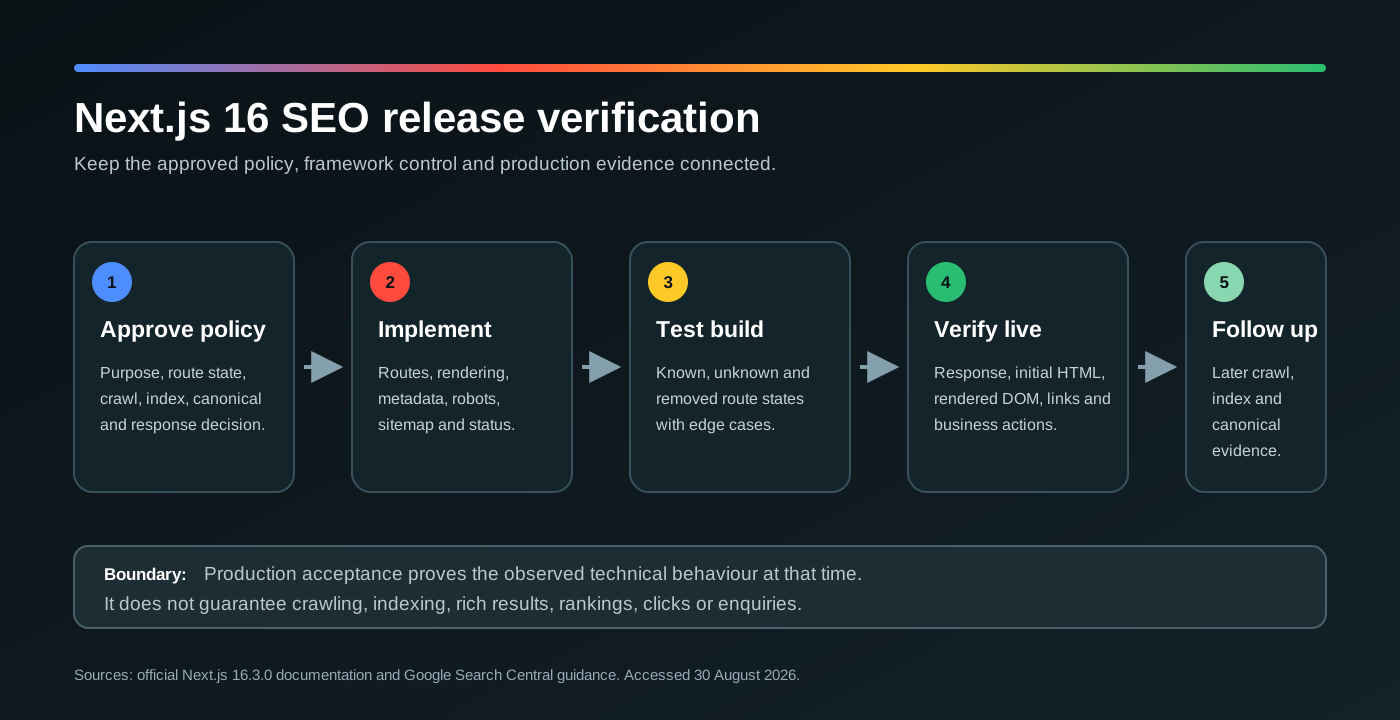
The file contains no client, account, credential or performance data. Replace the planning fields in a private working copy and keep confidential evidence outside a public download. The accompanying SVG explains the release sequence without claiming that technical acceptance predicts a search result.
- Keep one stable control ID for each decision.
- Replace example scope text with approved route families and URLs.
- Assign implementation, approval and production verification roles.
- Retain dated evidence outside the public template.
- Review sources after every Next.js framework upgrade.
Sources and further reading
Primary and authoritative sources used to support the factual guidance in this resource.
- Source 01Next.js Server and Client Components, opens in a new tabOfficial Next.js 16 guidance on rendering, hydration, client boundaries and interleaving Server and Client Components.
- Source 02Next.js metadata and Open Graph images, opens in a new tabOfficial overview of static metadata, generated metadata, streaming and file-based metadata conventions.
- Source 03Next.js generateMetadata API, opens in a new tabOfficial API reference for metadata fields, Server Component constraints, priority, streaming and shallow merging.
- Source 04Next.js robots.txt file convention, opens in a new tabOfficial API reference for static and generated robots files, user-agent rules, sitemaps and pass-through directives.
- Source 05Next.js sitemap.xml file convention, opens in a new tabOfficial API reference for static, generated, localized and split sitemap output.
- Source 06Next.js generateStaticParams API, opens in a new tabOfficial guidance for generated dynamic route parameters, dynamicParams and build or runtime behaviour.
- Source 07Next.js notFound API, opens in a new tabOfficial guidance for missing route rendering, noindex injection and status behaviour after streaming begins.
- Source 08Next.js redirect API, opens in a new tabOfficial reference for temporary redirect behaviour, contexts, thrown control flow and status codes.
- Source 09Next.js permanentRedirect API, opens in a new tabOfficial reference for permanent redirect behaviour and 308 responses outside the documented Server Action exception.
- Source 10Next.js JSON-LD guide, opens in a new tabOfficial implementation and serialization guidance for JSON-LD script elements in Next.js pages and layouts.
- Source 11Google Search technical requirements, opens in a new tabGoogle's minimum crawl, successful response and indexable-content requirements, which establish eligibility rather than guaranteed indexing.
- Source 12Google JavaScript SEO basics, opens in a new tabOfficial guidance for rendering, links, status handling, metadata and testing JavaScript-driven websites.
- Source 13Google canonical URL guidance, opens in a new tabOfficial guidance on redirects, canonical annotations, sitemaps and other canonical signals.
- Source 14Google robots.txt guidance, opens in a new tabOfficial explanation of robots.txt crawl controls and their limits for indexation management.
- Source 15Google sitemap guidance, opens in a new tabOfficial requirements and recommendations for maintained sitemap URLs and accurate last modification dates.
- Source 16Google redirects guidance, opens in a new tabOfficial guidance on permanent, temporary and alternative redirect methods for Google Search.
- Source 17Google crawlable link guidance, opens in a new tabOfficial guidance for anchor elements, href values, descriptive link text and link context.
- Source 18Google structured data general guidelines, opens in a new tabOfficial quality, relevance and eligibility requirements for Google structured data features.
- Source 19Google title link guidance, opens in a new tabOfficial explanation of the sources Google can use when generating a title link.