
An SEO budget only makes commercial sense when the value created by suitable new customers can cover the full investment. Search visibility, clicks and enquiries are useful measurements, but none of them answers that business question on its own.
This browser-based calculator works backwards from figures you control. Add the proposed monthly investment, one-off costs, planning period, gross profit per new customer and verified qualified-enquiry close rate. The calculator then shows the customers and qualified enquiries required to recover that investment.
The result is a break-even threshold, not a prediction. It does not estimate rankings, traffic, enquiries, customers or revenue. Keep the assumptions visible, compare them with actual business records and review the decision with your accountant or financial adviser where appropriate.
Free browser tool and worksheet
Calculate, document and review the break-even threshold
Use the browser calculator first, then record the assumptions, formulas, data owner, GST treatment and review date in the blank CSV.
Supporting files
Inspect the example and share the workflow
Use these companion files with the main worksheet. Check the evidence and limitations before adapting any example to a real website or campaign.
Browser-only planning calculator
Calculate the customer economics before making a forecast
Enter one consistent set of campaign costs, gross profit and historic close-rate assumptions. The calculator shows the number of customers and qualified enquiries needed to cover those costs. Your entries stay in this browser and are not saved or sent to analytics.
No break-even result is currently calculated.
Planning result
Enter your figures to build a transparent scenario
The calculator starts blank so it does not invent a budget, margin or close rate for your business. Use one priority service or customer type and keep every cost on the same GST basis.
- 1. Confirm gross profit with current business records.
- 2. Use a defined, historically qualified enquiry set.
- 3. Include both external and internal delivery costs.
- 4. Compare the result with practical customer capacity.
Review the method sources
Financial definitions: business.gov.au key financial terms, opens in a new tab. Planning method: business.gov.au budgeting guidance, opens in a new tab. Search measurement: Google Search Console metric definitions, opens in a new tab.
Define the decision before entering a number
Start with one decision: whether a proposed SEO investment is commercially supportable for the business over a stated period. Do not begin with a traffic target or a ranking promise. Begin with the products or services the business can deliver profitably, the customers it can serve and the evidence available from previous sales.
A break-even calculation identifies the point where the gross profit attributed to new customers equals the campaign investment entered. It does not establish when that point will be reached or whether SEO will cause it. The Australian Government describes break-even as the point at which income and expenses are equal. This calculator narrows that idea to a planning threshold for one marketing investment.
Use a planning period long enough to compare the full expected spend consistently. Include the same period when reviewing actual results later. Changing the period, scope or definition of a qualified enquiry changes the question and requires a fresh calculation.
- Name the priority service, product or customer group.
- Confirm that the business has capacity to fulfil suitable new work.
- Choose one planning period and record why it is appropriate.
- Separate a decision threshold from any forecast or guarantee.
- Assign one owner to verify the financial and sales inputs.
Use consistent financial inputs
Revenue is not the same as gross profit. Business.gov.au defines gross profit as sales minus the direct cost of producing the goods or services sold. The amount available to recover marketing investment is therefore smaller than the sale price whenever delivery has a direct cost.
Use average gross profit per suitable new customer, not the largest sale in the last year. Base it on a clearly defined customer group and a representative period. If services have very different economics, calculate them separately rather than combining them into one misleading average.
Treat GST consistently. Enter all costs and gross profit either excluding GST or including GST, then keep that treatment consistent throughout the worksheet. The calculator does not provide tax or accounting advice. Ask your accountant which treatment matches the business records being used.
Ongoing investment
Include the monthly SEO fee and any recurring implementation, software, content or internal labour cost that belongs to the decision.
One-off investment
Include setup, migration, development, measurement or internal implementation costs that occur once during the selected period.
Gross profit per customer
Use sales less the direct costs of delivering the relevant product or service, based on a defensible business record.
GST treatment
Keep every input on the same GST basis and state that basis beside any exported or shared calculation.
Define qualified enquiries and use a verified close rate
A contact-form submission is not automatically a qualified enquiry. Write a definition the sales team can apply consistently. It might require a genuine need for the priority service, an address inside the service area, a workable budget and a suitable delivery timeframe. Exclude spam, suppliers, job applications, duplicate contacts and requests the business cannot fulfil.
Calculate the close rate from qualified enquiries and the customers won from that same group over the same historical period. Do not divide customers by all website sessions or by an unrelated lead total. If the business has no reliable history, leave the field blank until records have been reviewed. A guessed close rate can make a precise-looking answer materially wrong.
The calculator multiplies gross profit per customer by the qualified-enquiry close rate to show expected gross profit per qualified enquiry as a planning assumption. That arithmetic does not predict which future enquiry will close or attribute the customer to SEO.
- Write the qualification definition before reviewing the records.
- Use customers and qualified enquiries from the same period and scope.
- Remove duplicates and record exclusions consistently.
- Keep personal information out of the shared worksheet.
- Recalculate when the offer, sales process or customer mix changes.
Understand the break-even formulas
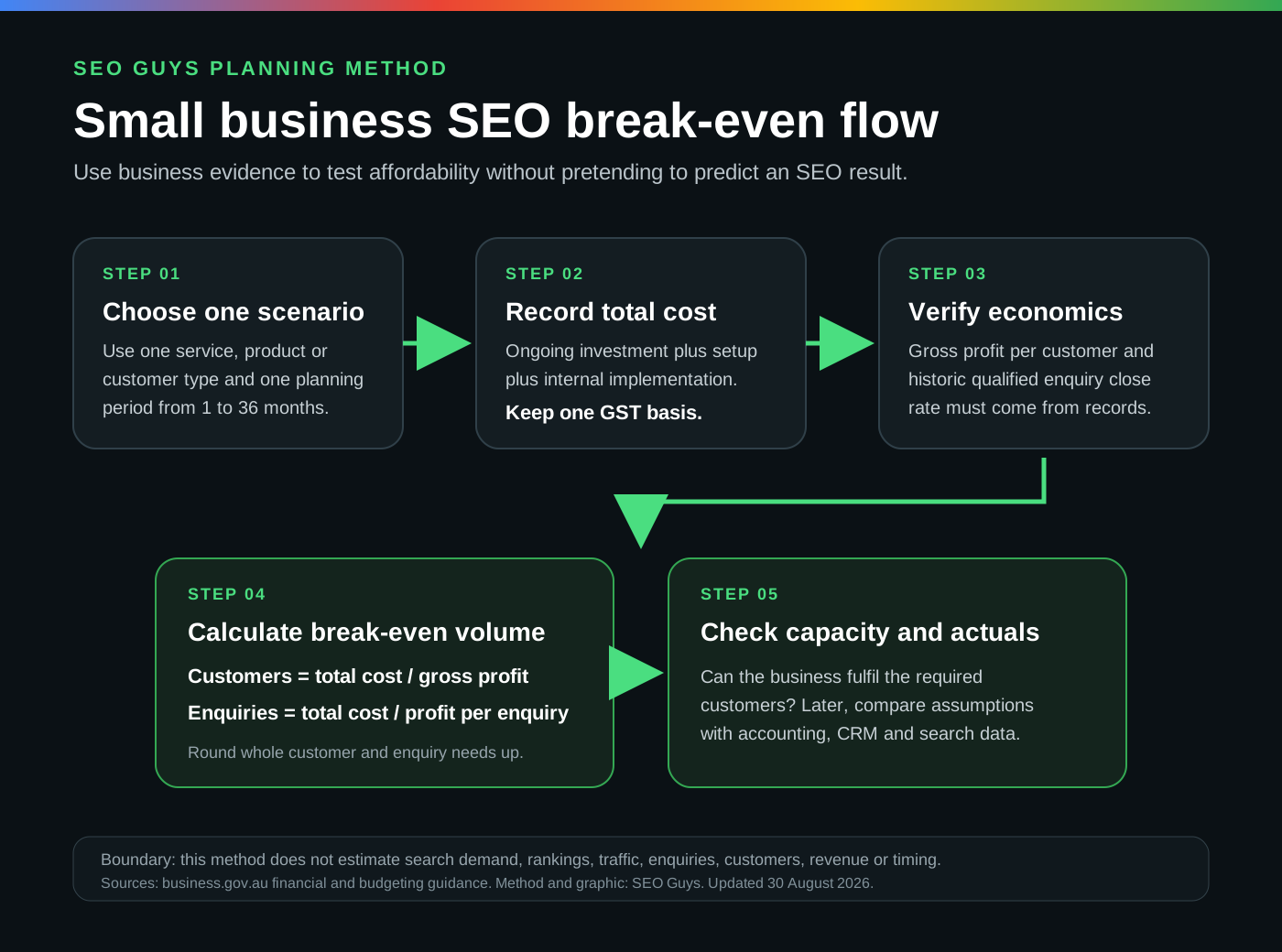
Total campaign investment equals the monthly SEO investment multiplied by the number of months, plus setup and other one-off implementation costs. Gross profit per qualified enquiry equals gross profit per customer multiplied by the close rate expressed as a decimal.
Break-even customers equal total campaign investment divided by gross profit per customer. Break-even qualified enquiries equal total campaign investment divided by gross profit per qualified enquiry. The displayed customer and enquiry thresholds are rounded up because a fraction of a customer or enquiry cannot recover the remaining amount in practice.
The monthly requirement spreads the unrounded qualified-enquiry threshold across the selected planning period. It is a comparison figure for capacity and measurement. It is not a monthly lead commitment and does not account for the timing lag between an enquiry, a sale and collected cash.
Total investment
Monthly investment x planning months + setup cost + other one-off implementation cost.
Gross profit per qualified enquiry
Gross profit per new customer x historic qualified-enquiry close rate.
Break-even customers
Total investment / gross profit per new customer, rounded up for the displayed threshold.
Break-even qualified enquiries
Total investment / gross profit per qualified enquiry, rounded up for the displayed threshold.
Test sensitivity and delivery capacity
One result can hide how sensitive the business case is to an uncertain assumption. The calculator shows lower and higher close-rate cases around the value entered. These are arithmetic scenarios only. They do not claim that the sales team or SEO campaign will produce those rates.
Compare the monthly customer threshold with genuine delivery capacity. If the business cannot fulfil that number of suitable customers, increasing traffic would not repair the business case. The offer, gross margin, price, scope, investment or target customer may need to change before more demand is useful.
Also consider cash flow. A business can pass a gross-profit threshold on paper while still experiencing a cash shortfall because fees are paid before customers pay, work is delivered over time or additional capacity has to be hired. A full budget and cash-flow forecast sit outside this calculator.
- Review a lower close-rate case rather than relying only on the base case.
- Confirm monthly fulfilment capacity with the delivery team.
- Test materially different products or services separately.
- Consider payment timing and working-capital needs outside this worksheet.
- Stop if the required customer volume exceeds responsible service capacity.
Compare the plan with search and business evidence
After implementation, compare actual outcomes with the recorded assumptions. Search Console can show impressions, clicks, click-through rate and average position for queries and pages. Google explains that these metrics depend on the selected dimensions and aggregation, and that some query data may be omitted for privacy. They should not be treated as a complete sales ledger.
GA4 can show organic landing-page sessions and configured actions. The CRM, call records, commerce system or sales team should determine whether an enquiry was genuine, qualified, won and commercially suitable. Keep the systems connected through a lawful identifier or documented review process without placing unnecessary personal information in SEO reports.
Do not attribute every organic customer to one page change or link. Brand activity, referrals, offline reputation, repeat customers, seasonality and sales follow-up can all affect the observed result. Record what changed, when it changed and what evidence would cause the plan to be revised.
Interpret the threshold responsibly
A lower threshold may be easier for the business to support, but it is not proof that SEO is the right channel. Search demand, current visibility, result-page competition, website quality, authority, implementation capacity and conversion experience still need separate investigation.
A higher threshold does not automatically rule SEO out. The business may value repeat purchases, retained revenue or strategic visibility that is not included in a first-customer gross-profit figure. Add those factors only when the business can support them with consistent records and accepts the extra uncertainty.
Google advises businesses to be cautious of SEOs that guarantee rankings. The ACCC also requires advertising claims to be accurate and not misleading. Treat proposals and forecasts as assumptions to test, ask what supports them and retain the underlying figures used in the decision.
Use the files and protect the inputs
The calculator runs in the browser. SEO Guys does not need the figures to perform the calculation, and analytics events must not include the amounts or percentages entered. Do not add customer names, contact details, account identifiers or other personal information to the downloadable worksheet.
The blank CSV preserves the assumptions and formulas for an internal review. The fictional example shows the expected structure and is not a benchmark for a real business. The decision-flow graphic can be reused with its source and limitations intact.
Record the date, data owner, GST treatment, qualification definition and source period beside the calculation. Review it when pricing, margin, close rate, service capacity, campaign scope or attribution rules change. Seek accounting, tax, legal or financial advice for decisions outside the limited planning purpose of this resource.
- Keep all calculator inputs on the user's device.
- Do not send entered financial or sales values to analytics.
- Label fictional and estimated values clearly.
- State the GST basis and source period.
- Retain the formulas and limitations when sharing the result.
Sources and further reading
Primary and authoritative sources used to support the factual guidance in this resource.
- Source 01Business.gov.au key financial terms, opens in a new tabAustralian Government definitions for break-even, gross profit, gross profit margin and related business measures.
- Source 02Business.gov.au profit and loss guidance, opens in a new tabGuidance on recording sales, cost of goods sold, gross profit, expenses, estimates and GST treatment.
- Source 03Business.gov.au budgeting guidance, opens in a new tabAustralian Government guidance for creating a budget, documenting estimates and comparing actual performance with the plan.
- Source 04Business.gov.au marketing plan guidance, opens in a new tabGuidance on target markets, measurable goals, marketing budgets and evaluating marketing activity.
- Source 05Google Search Console performance metrics, opens in a new tabOfficial definitions and reporting context for clicks, impressions, click-through rate and average position.
- Source 06Google Search Console data aggregation, opens in a new tabOfficial guidance on how Search Console groups and attributes performance data.
- Source 07Google Analytics traffic acquisition report, opens in a new tabOfficial guidance for reviewing how users arrive at a website, including organic search traffic.
- Source 08ACCC guidance on false or misleading claims, opens in a new tabAustralian competition and consumer guidance on accurate claims and reasonable grounds for future representations.
- Source 09Google guidance on working with an SEO, opens in a new tabOfficial guidance for choosing an SEO, retaining account control and avoiding providers that guarantee rankings.